
The 2027 Guide to Agentic Experience Optimization
In this article
Takeaways
- What is AXO? Agentic experience optimization (AXO) means making it easier for AI agents to use your product and verify the result. It covers the docs, screens and tools an agent uses on someone’s behalf.
- Start with a task customers already try. Pick a setup question from a support ticket, GitHub issue or onboarding session. Give the agent the same instructions and permissions a new customer would have. [1]
- Show what a successful run looks like. Put the supported version, required access, and a sample result in the quickstart. If the task runs in a browser, label the controls and explain how to recover from an error. [2] [3]
- Check the result yourself. If the agent says it parsed an invoice, open the job and compare the extracted line items with the original. A finished job with the wrong fields still fails the test. [1]
- Run the same test after the fix. Start with the same sample file and account setup. Check whether the agent can finish, and try a common failure such as an expired credential to see whether it explains what to do next. [1] [6]
When a coding agent tries your product, can it get from the quickstart to a working result? Here’s how to find where it gets stuck, fix that step, and run the task again.
Imagine a developer asks their coding agent to try your invoice parser. The agent uploads a sample invoice and reports that it parsed the file. When the developer opens the dashboard, the job is still running.
What agentic experience optimization covers
Agentic experience optimization helps agents complete and verify tasks with your product. It covers the website, documentation and interfaces an agent uses to evaluate, configure or operate the product on someone’s behalf.
An agent may read your pricing page to find out whether a plan supports invoice parsing, then open the quickstart to try it. If the sandbox doesn’t show which features are enabled, the agent can get stuck before it uploads a file. Test the steps from the first product question through to a result the developer can inspect.
The task may cross your website, software development kit (SDK), and application programming interface (API). If an SDK command returns a job ID, the next line of the quickstart should show how to use that ID to check progress and fetch the result.
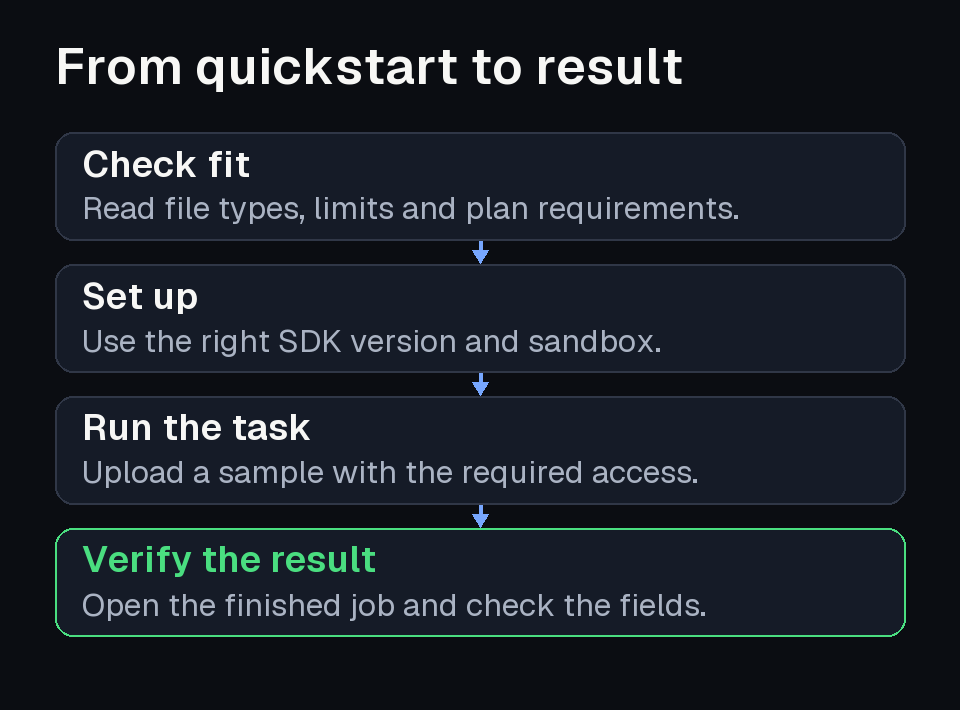
If the upload fails, check whether the agent can tell what went wrong and what it should do next. For a task that changes an account, include a run where the user declines approval.
Why the first successful task matters in 2027
In its 2026 Octoverse report, GitHub reported that developers started more than 40% of pull requests with an agent in September, up from 17% in March. For developer tools teams, a practical response is to run your quickstart with the coding agents your customers use. [7]
For a self-serve product, the first useful result is often how a buyer verifies the claims on a product page. If their agent cannot complete a sandbox integration, the buyer has to debug the setup before they can evaluate the product. A successful first parse lets the buyer inspect the output and decide whether it fits their workflow. Your team can track that event between signup and repeat use.
What research tells teams to measure
WebArena turns realistic browser tasks into checks against the site’s final state. Its follow-up, WebArena-Verified, audited 812 tasks and added backend checks for actions that change data. Apply the same idea to your invoice test. A grader should fail if the agent reports the correct invoice number but leaves the job pending or creates a duplicate. [14] [22]
Anthropic recommends checking the final state and reviewing the agent’s transcript. The state tells you whether the task worked. The transcript can show whether the agent stopped after upload, called the wrong endpoint or missed a permission error. Repeat the run to catch failures that happen only some of the time. [1]
How listening, AEO and agent experience fit together
- Agentic social listening surfaces reports about a workflow, such as a GitHub issue from a developer who uploaded an invoice and never saw the result.
- Answer engine optimization (AEO) checks what assistants tell buyers about your product, including which file types it supports and which pages they cite.
- Agentic experience optimization tests the workflow itself. In this case, check that the agent can get the expected fields from a finished invoice job.
What should you fix first, SEO, AEO or the agent experience?
Look for the first step that breaks. If Google can’t find or index your quickstart, start with search engine optimization (SEO). Link to the guide from the product page and make the setup instructions available as text. If an assistant recommends your parser but misstates which files it supports, check the answer and its sources. Fix the page that explains the file requirements, then ask the same question again. If the answer is accurate and the agent still stops at the job ID, update the quickstart and rerun the parsing task. Google’s guidance for its AI search features builds on the same search fundamentals, including crawl access and internal links. [13] [23]
A support thread can inform all three. If buyers need line items from scanned invoices, add a question that tests whether AI answers understand that requirement. Then run a parsing task using a scanned fixture and verify the rows. The answer review may point to an inaccurate comparison. The task run may point to a missing example or a limitation the product team needs to explain.
Start with one task a customer would delegate
Choose a task customers try early, such as parsing their first invoice. Start with a fresh sandbox and give the agent the same documentation, permissions and sample files a new customer would have.
| Product | Task to try | What counts as success |
|---|---|---|
| Developer tool | Install a supported SDK and run the first example in a clean project | The documented command runs and returns the expected result |
| AI API | Extract the vendor, invoice number and line items from a sample PDF | The job completes and the structured output matches the fixture |
| Technical business-to-business software as a service (B2B SaaS) | Import sample records, map fields and review skipped rows | The workspace contains the expected records and the import report explains every rejection |
Give the agent the goal in a sentence a customer might use. For the invoice example: “Use the documentation to parse the sample invoice. Return its invoice number, vendor and line items, with a result I can verify.” Keep the expected invoice fields in the test harness. The agent should get them from the product during the run.
Worked example: from job ID to verified invoice data
This example uses a fictional parsing API and a synthetic invoice. The expected invoice number is INV-1042, with two line items. The sandbox starts with no jobs.
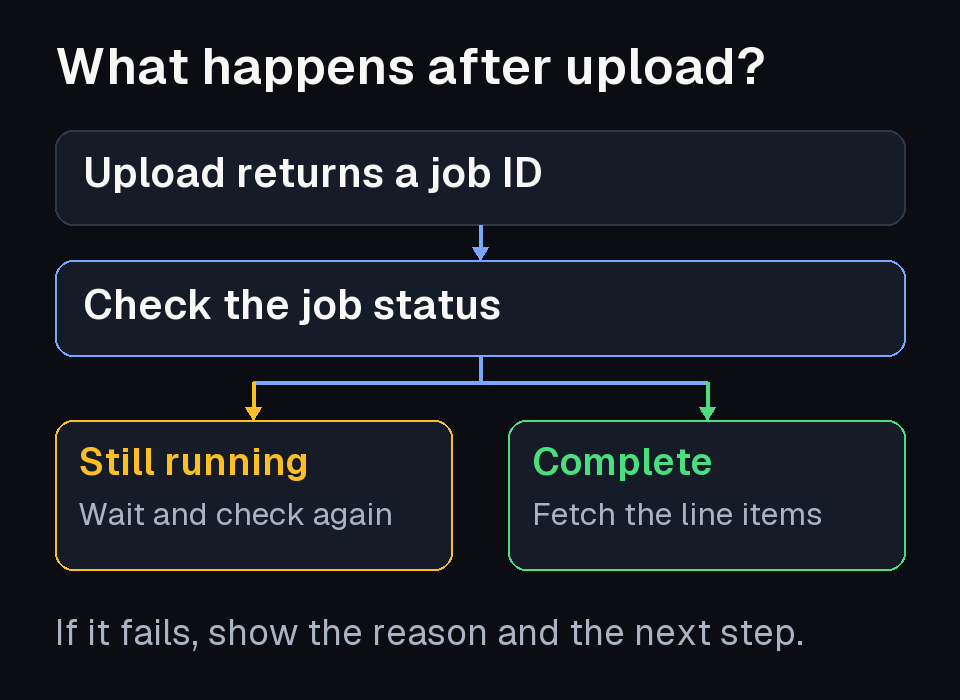
Before upload, confirm the quickstart matches the SDK version and sandbox. After upload, use the job ID to check status at the documented interval. Once it completes, fetch the result and check the invoice number and both line items.
If the agent stops at the job ID, put the submit, wait and fetch steps together in the quickstart. Include one completed response and one failed response. If a repeated request could create another job, document whether the service supports an idempotency key or an existing-job lookup. If the status request times out, the agent should tell the user the result is still unknown and return the job ID so they can check later. Anthropic’s tool-design guidance recommends actionable errors and responses that give the agent the information it needs for its next step. [5]
Retest with an unsupported file and an expired credential. For the unsupported file, check that the agent names the supported formats. For the expired credential, check that it explains how to reconnect. On the successful run, confirm that the sandbox has exactly one completed job and that its fields match the sample invoice.
Choose the interface your customers already use
| Interface | Where to start | What to check before launch |
|---|---|---|
| Website | Pricing, compatibility, onboarding and forms that customers already use | Descriptive links, labeled controls, keyboard access and a clear confirmation or error |
| Docs and SDK | Installation, configuration and versioned examples | Clean-environment setup, explicit prerequisites and output an agent can compare |
| Command-line interface (CLI) or API | Repeatable workflows that developers run from a terminal or service | Structured output, stable identifiers, clear errors and a documented way to verify the result |
| Model Context Protocol (MCP) | Tasks customers want to perform from a compatible assistant or coding agent | Clear tool names, typed inputs, scoped access and a result the assistant can present for review |
| WebMCP | Structured actions that belong to an existing website session | Browser support, tool registration, accurate action descriptions and a usable page when the client cannot call the tool |
Start with the path where the task currently fails. For the invoice example, fix the SDK quickstart before adding another interface. If customers frequently check parse status from an assistant, a narrowly scoped status tool that accepts a job ID and returns a clear state can save the agent from inferring progress. Chrome’s documentation explains the different roles of browser-based WebMCP and MCP. Its Lighthouse checks can help inspect tool registration and accessibility. Run the customer task to validate completion. [4] [8]
Make approval part of the workflow
An agent checking job status needs read access. Uploading a document, changing a subscription or sending a report can create a cost, share data or change a customer account. Give those actions clear descriptions and show the user what will happen before they approve. Enforce workspace access and permissions on the server. For actions with a preview, make the approval apply to the specific object and change the person reviewed. OpenAI’s tool reference describes annotations for read-only and destructive behavior. Use those annotations to inform the client and enforce the operation’s permissions in the product. [9]
Measure completion, recovery and adoption
Run a small evaluation with a fixed task set, representative starting states and the agents customers actually use. Record the agent client, model version, product version, starting URL and any account prerequisites. Repeat tasks that matter, because a single run can hide intermittent problems. Save enough of the trace to locate a failure and verify the product state separately. [1] [6]
| Measure | How to count it | Decision it supports |
|---|---|---|
| Verified completion | Runs with the expected product state divided by attempted runs | Which workflow is ready to recommend |
| Completion without help | Successful runs with no unplanned intervention divided by attempted runs | Whether a customer can delegate the task |
| Recovery | Expected failure cases that reach the documented next step divided by failure cases tested | Whether the instructions and errors help users recover |
| Time to first result | Time from the start of the task to a verified result, with failures reported alongside timings | Which setup steps to simplify |
| Unintended changes | Count duplicate jobs, changes outside the requested scope and actions attempted before approval | Which issues should block launch |
| Adoption | Track a meaningful product event, such as a first valid parse, and follow the cohort into repeat usage | Whether improved completion is followed by continued use |
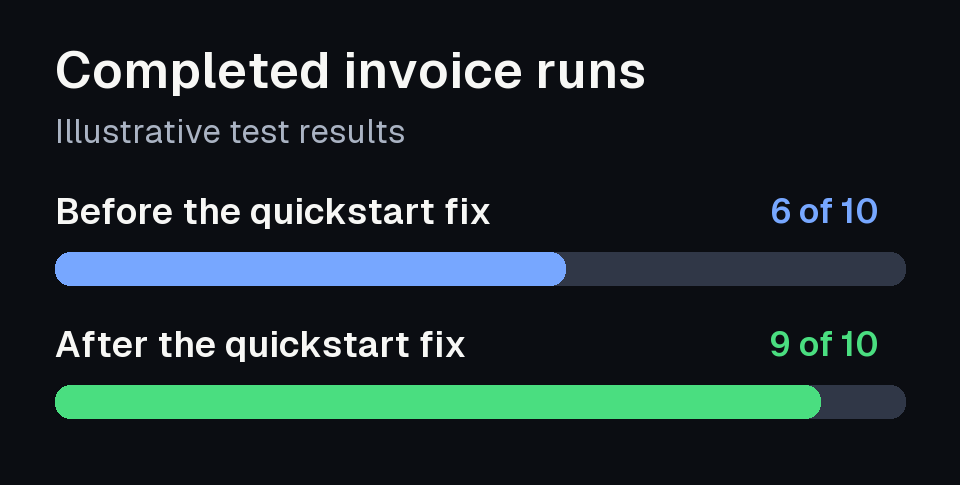
For example, suppose six of ten baseline runs complete and the other four stop after submission. After updating the quickstart, nine of ten runs complete and one reports a timeout with the job ID. In this example, the remaining timeout gives you a specific run to inspect. In production, compare how many new accounts complete a first parse and how many come back to parse another document.
Seven tools to evaluate for agentic experience optimization
Use the table to find tools for the part of the workflow you need to improve, from finding setup problems to testing a fix. This comparison uses public product documentation reviewed in November 2026.
| Tool | What it does well | When to choose it |
|---|---|---|
| EarShots | Agent Signal surfaces public coding-agent traces, including package choices, failed setup attempts and fixes recorded in sources such as GitHub pull requests. | Choose EarShots if you want to see how coding agents evaluate and use your product. Open the original evidence, reproduce the blocker, and check what AI assistants tell buyers about the same setup. [10] [11] [12] [13] |
| Scrunch | Combines AI answer visibility and agent traffic analysis with tools for optimizing and serving content to AI systems. | You need to see how agents access your website and improve how they retrieve its content. [15] |
| Mintlify | Publishes developer documentation in formats agents can read, including Markdown, documentation indexes and hosted MCP access. | The fix is publishing or maintaining better docs and making them easier for agents to retrieve. [16] |
| Speakeasy | Generates an MCP server from an OpenAPI specification and lets teams choose which operations to expose and how to describe them. | You know the API tasks agents should perform and need to build the tool interface. [17] |
| Browserbase and Stagehand | Provide browser sessions and an SDK for interacting with pages and extracting structured results. | You need to run the actual browser workflow, such as completing a sample import in a staging workspace. [18] |
| Braintrust | Runs evaluations against datasets with scorers and uses traces to investigate individual runs of the agents you instrument. | You already have representative tasks and want to compare results across product or agent changes. [19] |
| Chrome Lighthouse | Reports registered WebMCP tools and helps inspect their descriptions and setup. | You need to diagnose the page’s browser interface before running end-to-end tasks. [8] |
How Stripe documents a sandbox workflow
Stripe documents test environments, sample inputs and expected behavior for successful payments, failures and authentication. Its API also explains how to retry supported requests using an idempotency key. A team building a different product can borrow that structure: give the agent a sandbox, a known input, a result to inspect, and documented recovery when it cannot tell whether the first attempt worked. [20] [21]
Why choose EarShots for a technical product?
Use Agent Signal to see what coding agents do with your product. A public pull request can show which package an agent chose, the setup error it hit, or the change it made to get past it. Open the source, check the steps against your current quickstart, and give engineering a task it can reproduce in a sandbox. [10] [11] [12]
A recurring setup question can also become a prompt to track. For example, if developers keep asking whether scanned invoices are supported, check the current file requirements in Knowledge Hub, then see which sources AI answers cite for that question. The same report gives you a concrete input for the sandbox test.
Scrunch brings AI visibility, agent traffic and content delivery together. That fits teams focused on how AI systems retrieve information from their site. EarShots is built for technical teams that need to know why an evaluation stalled. If a coding agent tries an outdated setup command, use the original report and current docs to identify the step to fix. Rerun the setup in your sandbox and check whether AI answers still point buyers to the old command. [15] [10] [11] [13]
How to compare two vendors on the same task
Bring one recent evaluation blocker, your current quickstart and the AI answer a buyer might see. Ask each vendor to show which source supports the diagnosis, the first change it would make, and how your team would verify the result. For the invoice example, a good proposal identifies the missing completion step, names the page to fix and defines success as one completed job with the expected fields. If your biggest gap is finding those cases every week, evaluate EarShots on the relevance and traceability of the cases it surfaces. If you already know the cases, choose the tool that helps your team make or verify the change.
Use EarShots to decide what to test next
Start with a public setup question, a recurring integration blocker or a coding-agent action linked to its original evidence. Context Buzz and Agent Signal help technical teams find those examples. Check the product facts in your documentation and Knowledge Hub, then turn the example into a task for your own evaluation. Use Prompt Planner and Prompt Universe to track the related questions people might ask in AI search. [10] [11] [12] [13]
Here is a brief for a connected agent:
Find three recent examples of developers or coding agents getting stuck between setup and a first useful result. Link the evidence and record the product version when available. Pick one task we can reproduce in a sandbox. Give me the starting state, expected result, likely documentation or product change, and a way to verify it. Flag any inferred cause for review. Propose one related AEO question so we can check what assistants tell evaluators.
Put the original report, the quickstart change and the test result in the same ticket. When the SDK changes again, the team can rerun the steps without reconstructing the original problem.
A 30-day plan for your first agent experience review
- Week 1. Measure a task before changing it. Choose a task that matters to adoption. Run it in a sandbox and verify the result.
- Week 2. Fix the first recurring blocker. Assign an owner and ship the smallest change that helps the agent finish.
- Week 3. Retest success and recovery. Use the same task and starting state. Include an error case and verify that the agent respects the approval boundary.
- Week 4. Compare product outcomes. Review task completion and time to result. Check whether relevant customers reach the same milestone in production and choose the next workflow to test.
For browser implementation details, read How to make a website usable by browser agents. To build the discovery and listening sides of the program, see the 2027 guide to agentic AEO platforms and the 2027 guide to agentic social listening tools.
Sources
- Anthropic — Demystifying evals for AI agents
- W3C WAI — Labeling controls
- W3C WAI — User notification in forms
- Chrome for Developers — When to use WebMCP and MCP
- Anthropic — Writing effective tools for AI agents
- OpenAI — Trace grading
- GitHub — Octoverse 2026
- Chrome for Developers — Registered WebMCP tools
- OpenAI — Plugins reference
- EarShots — Context Buzz
- EarShots — Agent Signal
- EarShots — Knowledge Hub
- EarShots — Prompt Universe
- Zhou et al. — WebArena: A Realistic Web Environment for Building Autonomous Agents
- Scrunch — Agent Experience Platform
- Mintlify — Documentation platform
- Speakeasy — Standalone MCP Server Generation
- Browserbase — Stagehand
- Braintrust — How to test AI models
- Stripe — Testing
- Stripe — Idempotent requests
- WebArena-Verified — Benchmark and evaluation quickstart
- Google Search Central — AI features and your website