
EarShots for Enterprise
Turn social listening into action.
Improve your AI search visibility.
Bring social listening and AI search visibility into one workflow. Prioritize public conversations, draft replies grounded in your documentation, and track how AI engines mention and cite your brand.
From developer conversations to AI search
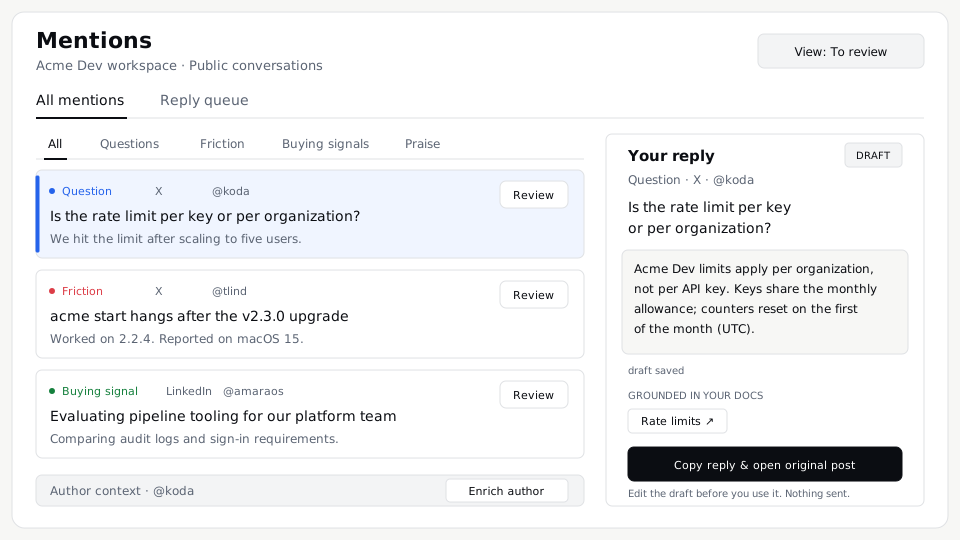
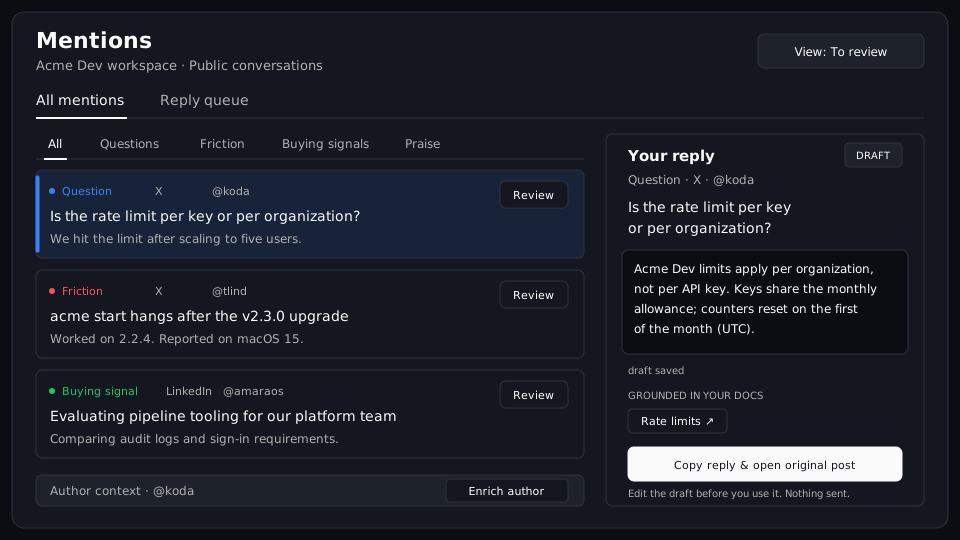
Sort questions, friction and buying signals for action. Review an X conversation beside a reply draft grounded in your documentation, edit it, then copy it to the original post when ready. Product illustrations use fictional example data.
Explore listeningOne connected workflow
From developer questions
to useful content.
Keep source posts, product knowledge and captured AI answers available as your team decides what to investigate, explain or write next.
- 01
Listen to developers
Find questions, friction and buying signals in public conversations. Keep the original post and the reason it belongs in your queue.
Developer listening - 02
Check the context
Connect product knowledge in Knowledge Hub. Use Ground Truth to compare claims with source evidence and identify what remains unverified.
Knowledge and claim review - 03
Inspect AI answers
Choose the questions worth tracking. Read captured answers, product mentions, competitors and cited pages across the supported engines.
Prompt Universe - 04
Turn findings into content
Start with a brief for a customer question or an AI answer gap. Create the documentation, comparison article or social drafts you need, then edit, approve and download them.
Campaign workflow
Different teams. Shared evidence.
Shared evidence for marketing, search, product and sales.
Choose the next page with evidence.
Connect the questions developers ask with the answers AI engines give. Commission a brief around a specific question, then review the facts, sources and page requirements before producing more content.
- Prompt coverage and captured answers
- Strategy briefs and comparison articles
- Documentation pages and social drafts
Find which questions and pages need attention.
Use captured AI answers in your answer engine optimization (AEO) and search engine optimization (SEO) planning. Inspect brand mentions, citations and competitor coverage, then review the cited pages to decide what to update or create. Build a brief around the question and the evidence your page needs.
- Captured answers and brand mentions by engine
- Own-site citations, cited pages and competitor coverage
- Question-specific briefs and content requirements
Bring the source to the product discussion.
Read recurring questions, integration blockers and public GitHub usage in context. Separate a developer's report from a confirmed product fact, and give the responsible team the original evidence.
- Source-linked developer questions
- Context Buzz and coding-agent activity
- Product context and claim-review findings
Respond with the product context in view.
Triage public questions and buying signals with the source post beside the work. Review documentation-grounded replies, check available role and company details through Listen Enrich, and export saved contacts for your CRM and outbound workflow.
- A shared mention and reply queue
- Saved drafts and supporting passages
- Contact CSV exports with profile and source links
Read the findings. Inspect the evidence.
Review sentiment, recurring themes, launch reactions and competitor conversation in a report your team can discuss. Keep the sample, source posts and limits available when a finding informs a decision.
- Sentiment and period comparisons
- Source-backed findings and implications
- A downloadable PDF for the discussion
The app and your agents
Connect your agents
to your workspace.
Work in the browser, use the command-line interface (CLI), or connect an agent through Model Context Protocol (MCP). Read saved evidence, materials and contacts from the same authorized workspace.
Supported agent actions can save drafts and queue a campaign brief. Human approval still controls the following campaign stages, and nothing publishes automatically.
$ earshots tools --json$ earshots call aeo_get_prompt_universe '{"limit":10}' --json$ earshots call get_campaign_materials '{}' --json$ earshots call list_contacts '{"limit":10}' --jsonThese examples read stored workspace data. Follow the setup guide and sign in before using them.
The preview application programming interface (API) reads saved data with workspace-scoped keys. Use contact reads for custom CRM exports and integrations. It does not generate, approve or publish content.
Enterprise deployment
Organize your products,
teams and review.
Organize work across product workspaces, assign the people responsible and agree the capacity your rollout needs.
- Monthly mentions / workspace
- 50,000
- Scheduled listening interval
- 1 hour
- Competitors / workspace
- Up to 15
Enterprise pricing is scoped with your team. AI answer usage and Listen Enrich credits are separate from the tracked-prompt allowance.
Compare plansWorkspaces for each product
Keep product context, sources and team membership together. People work within the workspaces they can access.
Workspace access and administration
Manage team membership and workspace-scoped API keys through the product's administrative controls.
Review before the next step
Inspect sources, revise drafts and approve campaign stages. Approval saves a decision; it never posts a reply or publishes a page.
Materials your team can use
Copy or download campaign content with its review state. Share reporting as a PDF and keep the supporting evidence available.
Integrations
Connects to the stack your marketing, SEO and community teams run on.
A practical starting point
Evaluate with one product. Then expand.
- 01
Bring your context
Start with your product names, documentation, public sources and the questions your team needs to answer.
- 02
Review the evidence
Inspect source conversations, captured AI answers and review findings. Confirm the context and choose the next useful task.
- 03
Scope the rollout
Agree workspace capacity, review ownership and contractual requirements before expanding to more products and teams.
Before you decide
Enterprise questions,
answered.
Product scope, review controls and deployment requirements for your evaluation.
What does EarShots Enterprise connect?
EarShots connects social listening, shared product context, claim review and AI search visibility. Teams can investigate a conversation, prepare a reply, inspect AI answers and create documentation, articles or social drafts around a specific question. Enterprise adds capacity and support for deployment across products and teams.
Which sources and AI engines can we monitor?
Listening covers GitHub, X, LinkedIn, Reddit and the public developer web. Prompt Universe records answers from ChatGPT, Gemini, Google AI Overviews and Claude, including product mentions and cited sources. Coverage depends on the connected sources, selected prompts and available engine results; it is not a complete record of every conversation or AI answer.
Can we edit and download the content?
Yes. Campaign materials include a strategy brief and the documentation, comparison article and social drafts you select. Review saved materials, edit eligible drafts, inspect sources and review findings, then copy or download the content as Markdown. Documentation pages can be downloaded individually. Draft and approved states remain distinct.
What can an agent do in our workspace?
Authenticated CLI and Model Context Protocol tools can read workspace records, including saved contacts for agent-led exports. They also support permission-checked actions such as saving drafts and queuing a campaign brief. Campaign stages still follow human approval requirements. The preview workspace API provides scoped reads of saved data, including contacts for custom CRM integrations; it does not generate, approve or publish content.
Does EarShots send messages or publish content?
No. EarShots saves drafts and review decisions. A person sends a reply in the original conversation or publishes exported content through their own system. Reply drafting is supported for eligible X, LinkedIn and Reddit conversations, not GitHub threads.
Is Listen Enrich included in the Enterprise plan?
Listen Enrich is a separately enabled, credit-backed capability. Profile and verified work-email lookups require an eligible identity, available credits and confirmation of the target and cost. A profile lookup does not automatically request email or contact the person. Scope enterprise enrichment volume with our team.
Do you support single sign-on or data residency requirements?
Single sign-on (SSO), data residency options and private network endpoints are not currently available. Review authentication, data handling and contractual requirements with the EarShots team before committing to a deployment.
How is Enterprise priced, and how do we start?
Enterprise is priced by agreement. The current plan provides 50,000 mentions per month per workspace, hourly scheduled listening, priority triage and up to 15 competitors per workspace, with no fixed plan cap on tracked prompts. AI answer usage and enrichment credits are scoped separately. Start with a product, its documentation, the sources to monitor and the team responsible for reviewing the results.
Build your first workspace
Plan your first
EarShots workspace.
Discuss one product, the sources to monitor and the decisions your team needs to make. Review the workflow, capacity and deployment requirements before expanding.